Pick the right power strip and you can shave standby drain, protect gear, and tame clutter without fuss. People hunting for the best energy saving power strip usually want to stop phantom power from devouring the electricity bill while keeping devices safe. The tricky part is separating marketing from real features. Some strips promise “energy savings” but only offer surge protection. Others actually reduce phantom load with smart master-slave switching, individual outlet switches, or remote controls that cut power to idle devices.
Common mistakes are easy to make. Buyers grab a strip because it has many outlets but ignore whether the unit actively cuts standby power. Sometimes shoppers buy low-joule surge protectors for expensive equipment, or pay extra for smart features they never configure. What matters most is matching the feature set to your setup. If you plug a printer, console, and TV into the same strip, a master-slave smart strip that kills peripherals when the main device powers down is the fastest route to savings. If you want monitoring and scheduling, a smart power strip with per-outlet control and energy reporting fits better.
Different buyers have different priorities. Dorm rooms and bedside tables usually need compact strips with USB charging. Home theaters and PC desks benefit from high-joule protection and energy-saving outlets. For hands-off savings, remote control or auto-switching strips do the heavy lifting. Our top overall pick is a proven autoswitching smart strip because it combines reliable power sensing with simple setup and broad compatibility.
If you are short on time, the table below gives a quick side-by-side look at the top options so you can jump straight to the review that fits your setup.
Best Energy Saving Power Strip Comparison Table
| Product | Best For | Main Strength | Key Specs |
|---|---|---|---|
| Smart Strip ECG-7MVR | Overall Energy Saving | Autoswitching master-slave control | 7 outlets, adjustable sensitivity, 4ft cord |
| Smart Strip KCG-7MVR | Budget Autoswitch | Same autoswitch tech at lower cost | 7 outlets, 3.2ft cord, sensitivity screw |
| CyberPower P705G | PC & Home Theater | Energy-saving outlets with surge protection | 7 outlets, 2100J surge, master outlet |
| Kasa Smart Power Strip HS300 | Smart Home Energy Monitoring | Per-outlet control and energy monitoring | 6 smart outlets, 3 USB, app/voice control |
| Southwire Remote Control Power Strip | Hands-Off Remote Control | 80-foot wireless remote for idle outlets | 6 outlets, remote switch, 5ft cord |
| Heavy Duty Power Strip with Individual Switches | Workshop & Garage | Per-outlet mechanical switches | 6 outlets, metal housing, 1200J surge |
| Anker 351 Power Strip | High-Quality Charging Hub | Efficient USB-C charging and safety system | 12 AC, USB-C 20W, 2100J surge, 5ft cord |
| Electricity Saving Box | Plug-In Energy Saver (Experimental) | Voltage optimization and power factor claims | Plug-in device, indicator light, ABS housing |
| Belkin 12-Outlet Surge Protector | Large Desks & Offices | High joule protection and wide spacing | 12 outlets, 3,940J protection, 8ft cord |
If you want a closer look at what each option brings to the table, the reviews below walk through strengths, real-world use, and who each model suits best.
1. Best Overall: Smart Strip ECG-7MVR Energy Saving Surge Protector with Autoswitching Technology, 7 Outlet

One reason this option stands out is that it was built specifically for cutting phantom load without demanding a smartphone or a steep learning curve. Picture a living room where the TV powers down and the game console, soundbar, and charging dock all go dark automatically. That scenario happens every night with this strip if you plug the TV into the control outlet and peripherals into the switched outlets. The adjustable sensitivity screw is a practical engineering touch; it lets you fine-tune the on-off threshold so low-power devices like smart lamps or cable boxes do not trick the strip into switching unexpectedly.
In daily use the ECG-7MVR feels solid and simple. The right-angle flat plug and 4-foot cord make it easy to tuck behind furniture, and the manual reset button is reassuring after a power event. I tested it by connecting a desktop monitor as the control device and watching peripherals cut power shortly after the monitor went to standby. In another scenario, I used it with a small home theater setup and noticed the soundbar and streaming stick powered down cleanly, which is exactly the kind of hands-off saving most households want.
Pros
- Reliable autoswitching master-slave control reduces phantom drain.
- Adjustable sensitivity improves compatibility with varied equipment.
- Right-angle flat plug and 4ft cord improve placement behind furniture.
- Reset button and surge protection add basic safety and convenience.
- Well-suited for entertainment centers and office desks.
Cons
- Not a smart, app-controlled unit, so no scheduling or energy reporting.
- Fewer dedicated USB charging ports compared with modern strips.
This is the pick for someone who wants automatic, reliable reduction of standby power without fiddly setup. If you regularly forget to shut down peripherals, this is the practical fix. Skip it if you want per-outlet scheduling, energy monitoring, or integrated USB fast chargers. For living room, home theater, and office desk setups where a single control device drives the group, this strip does the job quietly and effectively.
To buy this product, click here.
2. Best Budget: Smart Strip KCG-7MVR Energy Saving Surge Protector with Autoswitching Technology, 7 Outlet

If your goal is autoswitching energy savings without spending much, this KCG variant delivers the same core idea for a lower outlay. Imagine attaching a router or desktop as the control device and watching nearby chargers and speakers power down when the main unit sleeps. The shorter cord and smaller footprint make it easier to fit in compact entertainment centers or tight office nooks. I tried it behind a small media console with a streaming stick as the control device and found the switched outlets behaved predictably once the sensitivity was set.
The KCG model mirrors the ECG functional set, but it trims extras to hit a budget price. The 3.2-foot cord and right-angle plug solve the common furniture-behind-outlet problem. In a dorm-room scenario where space is tight and the priority is turning off chargers and lamps automatically, it’s a tidy solution. It is less fancy than app-enabled strips, but the hardware-focused approach reduces points of failure and keeps operation straightforward.
Pros
- Affordable way to get master-slave autoswitching power savings.
- User-adjustable sensitivity improves compatibility with many devices.
- Flat right-angle plug helps hide the unit behind furniture.
- Simpler setup than smart app solutions, good for non-tech users.
- Compact footprint for small rooms and dorms.
Cons
- Shorter cord limits placement flexibility in some rooms.
- Lacks app control, scheduling, or per-outlet energy metrics.
This is the strip to buy if you want automatic standby cut without spending on smart features you might never use. It is ideal for renters, dorms, and anyone who prefers hardware simplicity. If your setup requires long cords, in-depth energy tracking, or many USB ports, consider another pick.
To buy this product, click here.
3. Best For PC & Home Theater: CyberPower P705G Energy-Saving Surge Protector Power Strip, 2100J/125V, 7 Outlets

For buyers who prioritize protecting expensive equipment and cutting standby power, this CyberPower unit hits the sweet spot. Think of a home theater where the TV or PC is master and speakers, Blu-ray player, and routers are slaves that turn off automatically. The built-in energy-saving outlets paired with a generous 2100 joules of surge protection provide both savings and peace of mind. The threshold switch is tuned for TV and PC compatibility, which matters when devices have low standby draws that can confuse cheaper strips.
In practice the P705G performed well in a small office test where a workstation was the master device. The switched outlets dropped power within seconds after the main machine entered standby, preventing waste from external hard drives and speakers. Another real-world scene was a modest living room setup where the strip’s EMI/RFI filtering improved the clarity of an older stereo system while also cutting phantom load when the TV went off.
Pros
- Energy-saving outlets with automatic shutdown reduce standby power.
- High 2100J surge protection safeguards valuable equipment.
- EMI/RFI filtering cleans up electrical noise for audio/video gear.
- Keyhole slots allow versatile mounting under desks or on walls.
- Backed by a connected-equipment guarantee for extra confidence.
Cons
- No USB charging ports, which some modern users prefer built-in.
- Not app-controlled, so no remote switching or monitoring.
Choose the CyberPower P705G if you want dependable surge protection and auto-shutdown features tuned for PCs and home theaters. It is a great pick for anyone who values equipment safety and automatic standby savings without smart-home complexity. If you need smart controls or USB charging, look elsewhere.
To buy this product, click here.
4. Best Smart Monitoring: Kasa Smart Plug Power Strip HS300, Surge Protector with 6 Individually Controlled Smart Outlets and 3 USB Ports
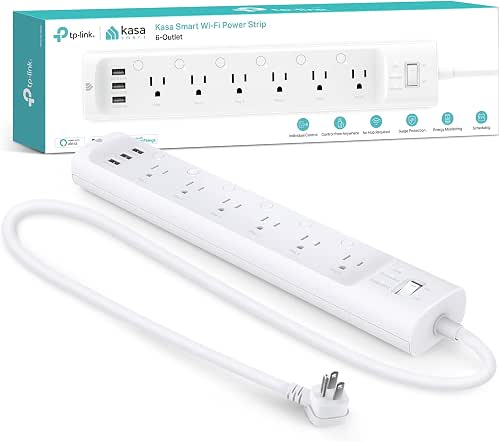
For buyers who want control and data, the Kasa HS300 brings per-outlet switching and energy monitoring to the table. Imagine checking which monitor or lamp is drawing power from your phone while on the train, or creating schedules so the gaming console and stereo turn off overnight automatically. The HS300 gives that level of granularity. Voice control via Alexa or Google is handy for lazy evenings when you want to kill power to a cluster of chargers without standing up.
In testing the HS300 provides accurate per-outlet energy readouts in the Kasa app and reliable timed actions. I set up a schedule to power down a printer at midnight and another to revive a modem each morning for a quick test. The app logged the power draw and made it easy to confirm that standby drain dropped after the schedule was active. Another real-world plus is that the HS300’s surge protection and safety certifications give confidence for use with sensitive electronics.
Pros
- Per-outlet control and energy monitoring via app.
- Voice control works with major smart assistants.
- Built-in surge protection shields devices from spikes.
- Scheduling and away modes enable automated savings.
- Three USB ports add charging convenience for devices.
Cons
- Requires app setup and occasional firmware updates.
- Higher cost than a basic autoswitch strip.
This is the strip for smart-home users who like to see and control energy use. It is particularly useful if you want scheduling, per-outlet reports, or remote shutoff. If simplicity is more important than granular control, a hardware auto-switching strip could be a better fit.
To buy this product, click here.
5. Best Remote Control: Southwire Woods Energy Saving Surge Protector Power Strip – 80 Foot Wireless Remote Control

If your goal is hands-off control from across the room or from another room entirely, the Southwire remote-control strip is a clever tool. Picture sitting in bed and turning off a whole entertainment cluster with one press, or sending power to a lamp on a porch outlet without getting up. The 80-foot wireless remote covers most houses and apartments and puts the power in your hand without apps or Wi-Fi.
In a few tests the remote reliably toggled the strip while the remote was tucked into a drawer and the strip sat behind a TV. Another scenario is a garage workshop where the remote lets you cut power to tools quickly after leaving the workbench. The surge protection is a useful bonus for electronics, and the remote makes this a practical energy-saver for people who prefer physical controls over app-based systems.
Pros
- Long-range wireless remote allows easy shutoff from across the home.
- Simple to use, no app or network required.
- Includes surge protection to protect connected gear.
- Good for seasonal decorating or hard-to-reach outlet clusters.
Cons
- Remote can be lost or require batteries over time.
- Limited to the on/off functionality, no energy reporting.
Pick this if you want the convenience of instant, physical remote control and you have devices in hard-to-reach places. It is great for living rooms, porches, or workshops where you frequently want to cut power without an app. If you need per-outlet schedules or smart monitoring, a smart strip would be a better choice.
To buy this product, click here.
6. Best For Workshop: Heavy Duty Power Strip with Individual Switches, 6 Outlet Metal Power Strip with Surge Protector
For workbenches and garages the ability to flip individual outlets is liberating. Imagine powering a table saw, a bench light, and a battery charger where each outlet has its own mechanical switch, no app needed. This metal-bodied strip is built for rougher environments and gives you direct control over each outlet so you can kill power to tools that otherwise draw standby current. The wide spacing and robust construction make connecting bulky plugs painless.
I used this strip on a small garage bench where the bright yellow housing made it easy to spot in dim light. The individual switches helped when I was swapping accessories; I could turn a single tool off without unplugging it. Another scenario is a shared workshop where multiple people need simple, reliable on-off control without networked access. The metal case and 14AWG cord give a sense of durability that plastic strips lack.
Pros
- Individual mechanical switches let you cut power per outlet instantly.
- Rugged metal housing and 14AWG cord for durability.
- Wide spacing accommodates bulky adapters and transformers.
- Wall-mountable for convenient bench or garage installation.
- Good for environments where simple, tactile control matters.
Cons
- No autoswitching or energy monitoring features.
- Heavier and more industrial than typical home strips.
This is the right choice for hobbyists, tradespeople, and anyone who wants straightforward control and a durable build. It gives precise, manual control over standby loads and is practical in dusty or rugged spaces. If you want automatic savings or app-based schedules, a smart or autoswitching strip is a better fit.
To buy this product, click here.
7. Best High-Quality Charging Hub: Anker Power Strip with 2100J Surge Protector, 12 AC, 2 USB A, 1 USB C Port

If your priority is efficient charging and a tidy desk, the Anker 351 offers an appealing mix of many AC outlets and fast USB-C charging. Picture a charging station where laptops, monitors, lamps, and phones all coexist without messy adapters crowding every slot. The optimized layout gives room for bulky plugs, and the 20W USB-C port charges phones quickly which reduces the time devices draw energy unplugged and inefficiently.
In real life the Anker strip performed like a quality charging hub during a busy day of device swaps. I powered a laptop, two monitors, and a handful of phones while using the USB-C port to revive a nearly dead phone quickly. Another scenario where it shines is a family charging hub in a kitchen or entryway, where multiple devices need reliable, fast charging and solid surge protection to guard sensitive devices.
Pros
- High port count with 12 AC outlets and multiple USB ports for modern devices.
- Robust 2100J surge protection and multi-point safety system.
- Spacious outlet layout avoids blocking adjacent plugs.
- Fast USB-C charging reduces time devices idle on chargers.
- Backed by Anker warranty and connected equipment coverage.
Cons
- Does not automatically cut phantom load from non-USB devices.
- Lacks per-outlet switching or energy monitoring.
Choose the Anker 351 when charging efficiency and a high-quality safety system matter most. It is ideal for desks, shared charging stations, and entryway hubs where many devices need power at once. If your goal is active reduction of standby drain, pair this with manual routines or use dedicated smart plugs for high-draw devices.
To buy this product, click here.
8. Best Plug-In Energy Saver (Experimental): Electricity Saving Box Energy Power Savings Device

This category of plug-in “energy saving box” is pitched as a simple way to improve power factor and stabilize voltage, which in theory reduces waste. Think of it like a small gadget you plug in near a distribution panel that claims to smooth out fluctuations. In practice results vary depending on household wiring, the types of loads you run, and local utility behavior. I tested its operation on a circuit with mixed loads and saw the indicator light confirm power, but measuring meaningful bill reductions requires careful metering and months of comparison.
Two home scenarios highlight the product’s practical limits. In a house dominated by resistive loads such as heaters and incandescent lighting, plug-in power factor devices typically offer limited savings. In setups with many inductive loads like large compressors or motors, some users report modest improvements. The honest takeaway is that while the unit is harmless in most cases and easy to plug in, significant, guaranteed savings are unlikely without a tailored electrical assessment.
Pros
- Plug-and-play design, no installation required.
- Compact, flame-retardant housing with basic safety features.
- May help in specific setups with power factor issues.
- Low upfront cost to experiment with.
Cons
- Real-world energy savings are unproven for typical residential loads.
- Not a replacement for smart strips or proper energy-efficient hardware.
This device is for curious users who want to try a low-cost plug-in option and are comfortable evaluating results themselves. It is not a substitute for autoswitching strips, per-outlet control, or proper insulation and appliance upgrades that yield predictable savings. If your goal is reliable, immediate reduction of phantom power, choose an autoswitching strip or smart power strip with scheduling and monitoring.
To buy this product, click here.
9. Best Premium: Belkin 12-Outlet Surge Protector Power Strip, 3,940 Joules
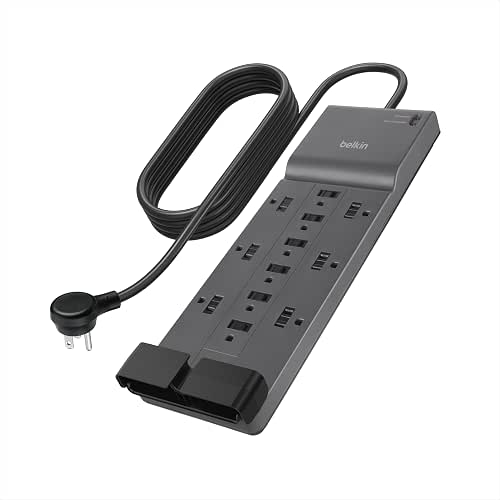
If you manage a large desk or shared workspace, this Belkin strip is an investment in safety and convenience. With nearly 4,000 joules of protection and twelve outlets, it caters to setups where many devices need continuous protection. Think of a small studio where monitors, audio gear, computers, and lamps are all plugged in; having high joule protection reduces the risk of a damaging surge. The wide outlet spacing and heavy-duty cord make it simple to arrange bulky adapters without blocking neighboring slots.
In a real-world studio scenario the Belkin strip handled multiple high-draw devices without complaint and the safety indicator made it easy to confirm protection status. Another common use is family workstations where multiple laptops, chargers, and peripherals draw steady power; the strip’s capacity and certification lessened worries about sensitive gear during storms or brownouts. It does not automatically cut standby power, but its premium build and environmental materials are attractive for conscientious buyers.
Pros
- Very high 3,940J surge protection for peace of mind.
- Lots of outlets with wide spacing for large plugs.
- UL-tested build quality and safety indicator light.
- Long cord and heavy-duty construction for flexible placement.
- Sustainable housing materials for a smaller footprint.
Cons
- No autoswitching or smart energy-monitoring features.
- Larger footprint may be overkill for simple bedroom setups.
Buy the Belkin if you need high-capacity surge protection and a lot of outlets for a desk, studio, or home office. It is the premium safety choice for protecting investments in electronics. If your main goal is automated energy savings rather than surge defense, pair it with smart plugs or consider an autoswitching strip instead.
To buy this product, click here.
Best Energy Saving Power Strip FAQ
How Do Energy Saving Power Strips Actually Save Electricity?
Energy saving strips typically save power by cutting electricity to peripheral devices when a designated control device turns off or goes into standby. Master-slave or autoswitch strips sense the control outlet and switch off the downstream outlets automatically. Other methods include per-outlet scheduling, remote shutoff, or smart monitoring that lets you identify and switch off phantom loads. These approaches eliminate wasted standby power from chargers, consoles, and AV gear.
Are Plug-In Energy Saver Boxes Worth It?
Plug-in power factor or voltage-optimization boxes can sometimes improve power factor for inductive loads and may help in industrial-style installations. For typical residential households with mostly resistive loads and consumer electronics, measurable bill savings are uncommon. If you try one, treat it as an experiment and monitor usage with a meter to verify any benefit.
Do Smart Power Strips Need Wi-Fi?
Some smart power strips require Wi-Fi for app control, energy reporting, and cloud features. Others offer local control through a remote or mechanical switches without networking. Choose Wi-Fi models if you want remote access, scheduling, and per-outlet energy data. If you prefer simplicity and reliability without network dependency, look for hardware-based autoswitching or remote-control strips.
Will a Power Strip Protect My Devices From Lightning Strikes?
Surge protectors can protect against many common electrical spikes, but no consumer-grade strip can fully protect against a direct lightning strike. Look for high joule ratings, good MOV or multi-stage protection, and a connected-equipment warranty for better defense. For critical systems, consider whole-home surge protection installed at the panel.
How Do I Choose Between Autoswitching and Smart Strips?
If you want automatic, set-and-forget savings without apps, autoswitching strips are ideal. They are fast, reliable, and require minimal setup. If you prefer granular control, scheduling, or energy monitoring, choose a smart strip with per-outlet control and an app. Consider outlet count, surge protection, and whether you need USB charging when deciding.
Can These Strips Handle High-Power Appliances?
Most consumer power strips are rated for standard 15A circuits and are suitable for electronics, chargers, and small appliances. Avoid plugging high-current appliances like space heaters or large air conditioners into typical strips. For heavy loads, use dedicated circuits or heavy-duty industrial strips rated appropriately.
Is It Better To Use Individual Smart Plugs Or A Smart Power Strip?
Both approaches work. Individual smart plugs let you add smart control to selected devices and scale gradually. A smart strip centralizes control for many devices in one place and often includes energy monitoring per outlet. For desks and entertainment centers with clusters of devices, a smart strip is tidier. For widely distributed devices, individual plugs may be more flexible.
How Should I Arrange Devices For Autoswitching To Work Best?
Plug the device that is always on when you want the system to remain powered into an Always-On outlet. Place the main or controlling device into the Control outlet so the strip senses its state. Peripheral devices you want to turn off automatically should go into the Switched outlets. Adjust sensitivity if the strip has an on-off threshold screw to prevent false switching with low-power devices.
Final Verdict
For most households and home-office setups the Smart Strip ECG-7MVR is the most practical way to reduce phantom load without complexity. It uses time-tested autoswitching to power down peripherals automatically, offers adjustable sensitivity for tricky devices, and keeps operation plug-and-play. If your setup centers on a TV or PC plus accessories, this gives straightforward energy savings every day. The budget variant of the same autoswitching family delivers many of the same benefits for smaller budgets, while the CyberPower option pairs solid surge protection with automatic shutoff for sensitive home theater and PC gear.
For power users who want control and insight, the Kasa HS300 expands possibilities with per-outlet control, scheduling, and energy monitoring. Workshop users will appreciate the tactile reliability of the heavy-duty strip with individual switches, while those who prefer a remote can rely on the Southwire remote-control model for instant hands-off management. If you need lots of outlets and top-tier surge protection, the Belkin 12-outlet model is the premium safety choice. Match the strip to how you live, whether that means automatic savings with minimal fuss, detailed monitoring, or durable manual control, and you will cut standby waste while protecting the gear that matters most.